 3 weeks ago
28
3 weeks ago
28
When you accidentally delete a production namespace or a cluster upgrade fails, rebuilding your Amazon Elastic Kubernetes Service (Amazon EKS) cluster resources means recreating every deployment, service, and persistent volume manually. With Velero, a backup and restore tool for Kubernetes, you capture resource definitions to Amazon Simple Storage Service (Amazon S3) and persistent volume data as Amazon Elastic Block Store (Amazon EBS) snapshots. Velero supports cross-cluster restores, namespace-level granularity, and portability across Kubernetes distributions. If you need centralized, fully managed backup scheduling instead, AWS Backup for Amazon EKS handles that for you.
In this post, you’ll learn to back up and restore Amazon EKS cluster resources and persistent volume data using Velero. You’ll deploy a sample stateful application, back it up, and restore it to a different namespace within the same cluster. Along the way, you’ll configure least-privilege AWS Identity and Access Management (AWS IAM) roles using Amazon EKS Pod Identity and scope Velero’s Kubernetes permissions with a custom ClusterRole. A ClusterRole is a Kubernetes resource that defines cluster-wide permissions.
Prerequisites
You’ll spend 45 to 60 minutes on this tutorial and incur costs for Amazon S3 storage (based on data stored), Amazon EBS snapshots (based on snapshot storage), and Amazon EKS cluster usage (based on cluster runtime). For detailed pricing information, see Amazon S3 Pricing, Amazon EBS Pricing, and Amazon EKS Pricing. Clean up instructions at the end help you remove all billable resources. To complete this tutorial, make sure you have the following:
- An active AWS account with permissions to create Amazon S3 buckets, IAM policies and roles, and Amazon EKS resources
- An Amazon EKS cluster running Kubernetes 1.35 or later with Amazon EKS Auto Mode enabled. Auto Mode automates networking, node provisioning and scaling. You can use eksctl to create this cluster – Refer steps here
- AWS CLI v2, Helm v3.x, and kubectl installed and configured
- Experience with Kubernetes concepts such as pods, deployments, and persistent volumes, and with IAM roles
The default Velero installation uses cluster-admin, which grants broad access to cluster resources. This tutorial replaces it with a least-privilege ClusterRole. Follow those steps for non-demo environments.
Velero overview
Velero is an open-source tool that backs up and restores Kubernetes cluster resources and persistent volumes. Unlike traditional backup solutions that require direct access to storage systems, Velero works through the Kubernetes API to discover and back up resources. This API-driven approach provides several advantages:
- Kubernetes-native: Velero understands Kubernetes resources and their relationships
- Flexible filtering: You can scope backups by namespace, resource type, or label
- Cloud-agnostic: The same backup can be restored to different Kubernetes distributions
- Snapshot integration: Velero integrates with cloud provider snapshot APIs for persistent volume backups
An application-level backup in Amazon EKS targets two components:
- Kubernetes objects and configurations stored in the EKS control plane
- Application data stored in persistent volumes
Refer to the Velero documentation for details on resource filtering.
Backup and Restore Workflow
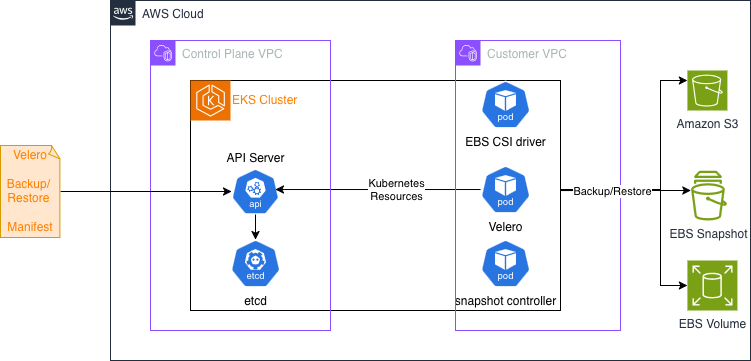
Velero uses a controller deployed as a Kubernetes Deployment to perform backup and restore tasks. A user submits a Backup manifest or Restore manifest (Custom Resource) to EKS, for the Velero controller to perform Backup or Restore. Velero documentation provides details on how they work here.
Tutorial
This tutorial uses Amazon EKS Auto Mode to simplify cluster management. Velero does not require Auto Mode and works on any Amazon EKS cluster. The walkthrough backs up an application in namespace myprimary and restores it to another namespace myrestore in the same cluster.
Set up environment variables
Substitute your cluster name and Region in the following exports. The tutorial references these variables in every subsequent step.
Configure Amazon S3 and IAM
First, provision the Amazon S3 bucket where Velero stores backup data.
Next, define an IAM policy granting Velero read/write access to the bucket and Amazon EBS snapshot permissions.
The following commands capture the policy ARN, set up an IAM role with EKS Pod Identity trust, and attach the policy. Using EKS Pod Identity, your Kubernetes pods can assume IAM roles without managing credentials.
With the role created, capture its ARN and associate the Velero service account through Pod Identity.
Install Velero
Velero uses Amazon EBS snapshots to take backup of Volumes. This requires the snapshot controller add-on to be installed on you EKS cluster. Connect to your cluster and install it first.
Generate the Helm values file for Velero chart install. This configures Velero to use your Amazon S3 bucket for backup storage, your Region for Amazon EBS snapshots, and Pod Identity for authentication.
Install Velero with Helm and verify the pod is running.
The default Velero installation binds to cluster-admin, granting broader permissions than necessary. Replace it with a least-privilege ClusterRole that scopes permissions to only what Velero needs.
Now define a VolumeSnapshotClass. This Kubernetes resource specifies the Container Storage Interface (CSI) driver for Amazon EBS snapshots. See the Kubernetes VolumeSnapshotClass documentation for options.
Restart Velero and verify storage locations are available.
Back up an application
Deploy a sample application that mounts a PersistentVolumeClaim (PVC). A PVC is a Kubernetes request for storage that provisions an Amazon EBS volume. The application writes timestamped messages to a file that you use to verify the restore. The following manifest deploys the application in the myprimary namespace. It creates the namespace, a StorageClass for encrypted gp3 Amazon EBS volumes, a PVC, and a Deployment that writes to the persistent volume.
Verify the pod is running. Node provisioning by Amazon EKS might take a couple of minutes.
Define a Velero Backup custom resource for the myprimary namespace. This YAML scopes the backup to specific resource types and triggers Amazon EBS snapshots for persistent volumes. See the Velero Backup API documentation for filtering options.
After a couple of minutes, confirm the backup completed.
Restore an application
Restore the backup to a new namespace called myrestore. Velero’s namespace mapping redirects resources from myprimary to myrestore. Apply the Restore custom resource. This YAML specifies which backup to restore and how to map namespaces.
Confirm the restore completed.
Check the data file on the restored pod.
The output shows messages from myprimary, confirming that Velero restored the persistent volume data from the Amazon EBS snapshot.
Clean up
Remove the resources you provisioned to stop incurring charges for Amazon S3 storage, Amazon EBS snapshots, and Amazon EKS compute.
Also check the Amazon EBS console for remaining snapshots or volumes and delete them manually.
Conclusion
You configured Velero on Amazon EKS to back up and restore Kubernetes cluster resources and persistent volume data with least-privilege AWS IAM roles and a scoped ClusterRole. To build on what you’ve learned, try these next steps:
- Automate daily backups of your production namespaces with a Velero Schedule resource.
- Test a cross-cluster restore to a second Amazon EKS cluster in a different Region using the Velero disaster recovery documentation.
- Evaluate AWS Backup for Amazon EKS and compare centralized scheduling against namespace-level granularity and cross-cluster portability.
- Harden your cluster security by reviewing the Amazon EKS security best practices guide.
Share your experiences in the AWS containers community forum.
For reference, see the following resources:
- Velero documentation
- Amazon EKS User Guide
- Amazon EKS Pod Identity
- Amazon EBS CSI driver
- IAM best practices for Amazon EKS
- Amazon S3 bucket policies
- AWS Backup Developer Guide